What is the View Cube?
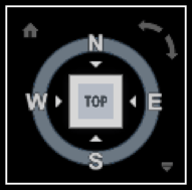
The ViewCube is a tool that helps you switch between Standard and Isometric View in the 2D model space or in 3D Visual style. It has a Clickable and draggable interface when it is usually displayed in one of the corners of the drawing area over the model in an inactive state. Is becomes active when a mouse is positioned over the ViewCube.
It may be great and very intuitive, but when you are working in 2D Model Space it may get very annoying if you accidentally click on it, and the view rotates. Sometimes in a bigger drawing if you are using a lower-end PC, clicking on one of the isometric views can even crash the drawing.
So how to Turn ViewCube Off Then?
To turn it off follow these two simple steps:
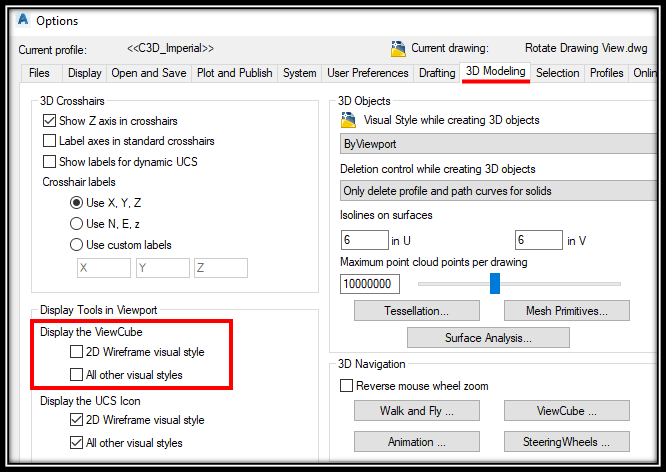
- Go to Options (Right Click on the empty space) > 3D Modeling.
- Uncheck ‘2D Wireframe visual style’ and ‘All other visual styles’ under Display the ViewCube. That is it!
Alternatively, you can set DISPLAYVIEWCUBEIN2D and DISPLAYVIEWCUBEIN3D system variables to ‘OFF’
Hope you found this information useful. Don’t forget to check our other AutoCAD Tips for more Tips and Tricks like this one.
When to use it
Turn the ViewCube off when you work only in 2D, for example on plans and sections. In that case it just sits over your drawing and gives you a chance to rotate the view with one wrong click. It is also worth doing on a slower computer working on a big drawing.
Tips and common mistakes
- The Options dialog has two separate checkboxes, one for the 2D wireframe visual style and one for all other visual styles. If the ViewCube still appears, check that you unchecked both.
- The system variables DISPLAYVIEWCUBEIN2D and DISPLAYVIEWCUBEIN3D work the same way. Set them to OFF for the same result.
- This only changes what is displayed. To get the ViewCube back later, tick the boxes again or set the variables back to ON.
Related tutorials
Try it on your own drawing
TerraDraft Lite is free to download.