
As a European, who is often working on US projects, it is hard for me to imagine the scale of the work in different units. Ahh… I Hate this imperial system, there are so many numbers for remembering. Hopefully, I found that tiny app that is built in the AutoCAD and converts tons of units in a wimp.
The app creators are CAD Studio and they thought of every type of conversion that may be needed by any type of professional as they said: “Converts hundreds of international and historical physical measurement units, not only from the CAD area - length, area, volume, time, mass, density, speed, pressure, force, moment, power, flux, numbers, luminous intensity, electric charge, etc.”
You just have to download the app from here. Then Install it and run it either from the Ribbon or through a command CONVERTUNITS.
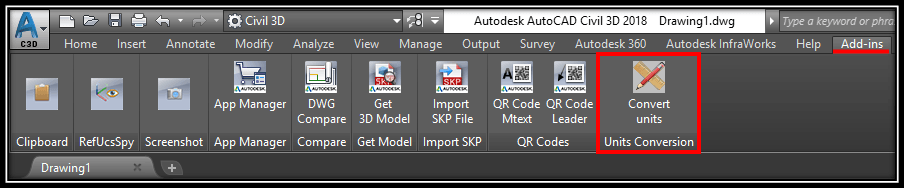
And what is the best part? The app is absolutely free! One Giant Thank you to CAD Studio from our team!
A video showing the app functionality:
Check out our other AutoCAD Related Topics and become one of the best in your company!
When to use it
This helps when you work with drawings or specifications in a unit system you do not use every day, for example a European drafter reading imperial notes on a US project. Instead of searching the web or opening a calculator, you can convert a value without leaving the drawing.
Tips and common mistakes
- CONVERTUNITS is a separate free app from CAD Studio, not a standard AutoCAD command. If typing the command does nothing, the app is probably not installed yet.
- Once installed, you can start it from the Ribbon or by typing the command name.
- Use it to check a number, then type the result into the command you are working in. Always confirm that the value you converted is the one you actually need, especially with area and volume.
Related tutorials
Try it on your own drawing
TerraDraft Lite is free to download.